Building reliable event sourced agentic system with Kafka, Temporal and LangGraph
Summary
In this post, we will see how to build a reliable event sourced agentic system using Kafka, Temporal and LangGraph.
We will use a fraud investigation workflow as an example. An alert starts an investigation. Multiple agents collect evidence, an LLM analyses it, policy code calculates the risk, and some cases are sent to a human reviewer. The workflow can run for a few seconds or wait for a reviewer for multiple days.
The main challenge is not calling the model. It is making sure that the complete investigation survives worker failures, retries and deployments, and that we can later explain why a decision was made.
We will use the following components:
- An event store to keep the complete history of an investigation
- Kafka to transport alerts and domain events
- Temporal to run the durable business workflow
- LangGraph to run the LLM reasoning loop
- Projections to build the dashboard and other read models
The reference implementation used in this post is Chronicle. It contains five agents, human review, an event store and a live dashboard. The same architecture can also be used for support automation, compliance checks, claims processing and other long-running agent workflows.
Architecture
Our application consists of the following services:
- Alert producer
- Kafka
chronicle.alertstopic for new alertschronicle.eventstopic for stored facts- Temporal
- Investigation workflow
- Agent activities
- LangGraph reasoning agent
- Postgres event store
- Outbox relay
- Projection service
- Human review service
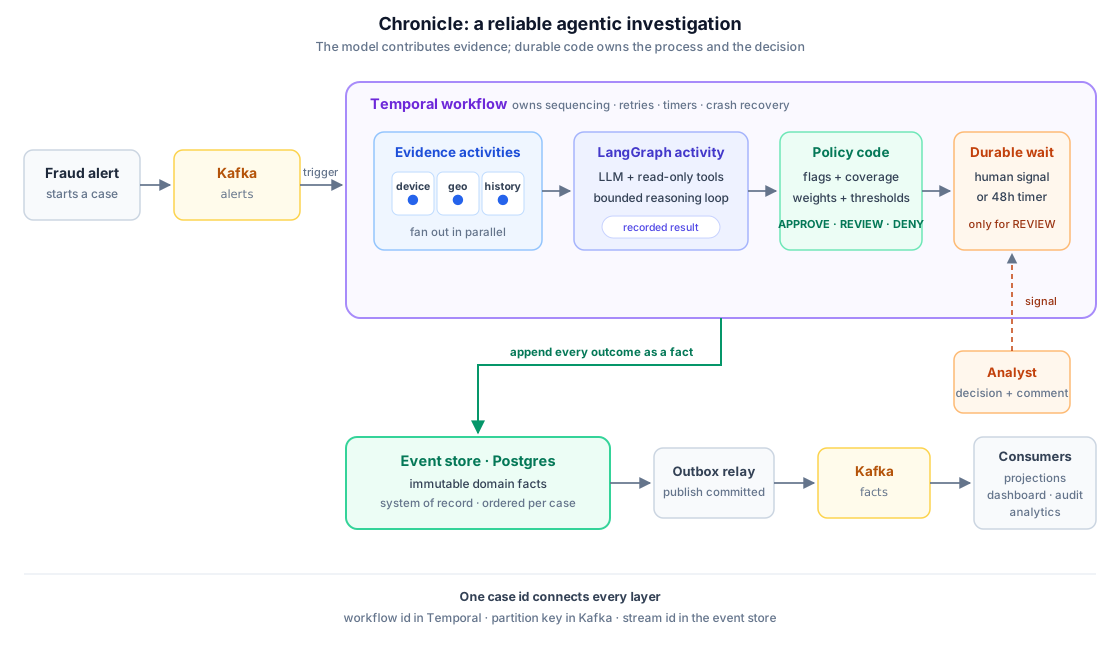
Here are the high level steps for one investigation:
- Publish an alert to Kafka.
- Start a Temporal workflow using the alert id as workflow id.
- Run device, geo and customer evidence agents in parallel.
- Store the evidence returned by each agent as events.
- Run a LangGraph agent to generate a risk analysis.
- Run deterministic policy code to calculate
APPROVE,REVIEWorDENY. - If required, wait for a human review signal or a timeout.
- Store the final decision and publish all stored events through Kafka.
- Fold the events into projections used by the dashboard.
Let us go through each part in more detail.
Store facts instead of current state
A normal CRUD implementation will have an investigations table and update the same row as the workflow moves forward:
This is enough to display the latest status, but it does not tell us how the case reached that status. Once the row is updated, information about the previous state is lost unless we store it separately.
For an agentic system, the path to the decision is important. We need to know:
- Which evidence was available?
- Which evidence source failed?
- What prompt and model version were used?
- Which tools did the reasoning agent call?
- What did the policy calculate?
- Did a human override the policy recommendation?
In an event sourced system, we store everything that happened as an immutable event. Current state is calculated from these events.
For our fraud investigation, the event stream can look like this:
1  InvestigationStarted
2  DeviceEvidenceCollected
3  GeoEvidenceCollected
4  CustomerEvidenceCollected
5  LLMReasoningGenerated
6  RiskAssessed
7  ManualReviewRequested
8  ManualReviewCompleted
9  InvestigationCompleted
Each investigation has its own stream. The alert id is used as the stream id, and each event gets the next position in that stream.
A simplified event envelope looks like this:
{
  "event_id": "evt-01K...",
  "stream_id": "case-8421",
  "position": 5,
  "event_type": "LLMReasoningGenerated",
  "correlation_id": "case-8421",
  "causation_id": "evt-evidence-completed",
  "occurred_at": "2026-06-13T10:41:12Z",
  "payload": {
    "model": "model-name",
    "prompt_version": "fraud-review-v3",
    "reasoning": "Transaction is unusual for this customer...",
    "tool_calls": [],
    "degraded": false
  }
}
There are a few important properties here:
- Events are named in past tense because they represent completed facts.
- An event is never updated. A change is stored as another event.
correlation_idconnects everything belonging to one investigation.causation_idtells us which earlier event caused this event.- The payload contains enough information to understand the event later.
LLMReasoningGenerated does not mean that the model output is correct. It only records that the model generated this output using a given prompt and evidence. Agents contribute evidence to the investigation; they do not own the investigation state.
Run the investigation using Temporal
The investigation is a long-running business process. It can be interrupted by deployments, worker failures, model timeouts or a human who does not respond for two days.
If we implement this ourselves, we need queues between steps, a table to track progress, retry logic and a scheduled process to find stuck investigations. Temporal provides these capabilities as part of durable execution.
A simplified workflow looks like this:
class InvestigationWorkflow:

    async def run(self, alert):
        investigation = await start_investigation(alert)

        evidence = await gather_in_parallel(
            collect_device_evidence(alert),
            collect_geo_evidence(alert),
            collect_customer_evidence(alert)
        )

        reasoning = await run_reasoning_agent(evidence)
        assessment = await apply_policy(evidence)

        if assessment.verdict == "REVIEW":
            review = await wait_for_review_or_timeout(hours=48)
            verdict = review.verdict
        else:
            verdict = assessment.verdict

        await complete_investigation(verdict)
This is only pseudocode, but the important part is that the workflow definition looks similar to normal application code. Temporal records every activity scheduled, activity result, timer and signal in its execution history.
If the worker dies after collecting device evidence, another worker can replay the workflow history and continue from the pending step. The completed device activity is not executed again during workflow replay because its result is already present in Temporal history.
We can configure timeout and retry policy for each activity:
activity_options = {
    "start_to_close_timeout": "2 minutes",
    "retry_policy": {
        "initial_interval": "2 seconds",
        "backoff_coefficient": 2,
        "maximum_attempts": 5
    }
}
Long-running LLM activities should also heartbeat. If a worker dies while the agent is running, Temporal detects the missing heartbeat and retries the activity without waiting for the complete activity timeout.
The workflow code must remain deterministic because Temporal reconstructs workflow state by replaying it. We should not directly read the system clock, generate random ids, read mutable configuration or call an LLM from workflow code. Temporal provides deterministic alternatives for time and ids. External and nondeterministic work belongs in activities.
Run LangGraph inside a Temporal activity
LangGraph and Temporal can both be described as orchestration frameworks, but they solve different problems.
Temporal orchestrates the complete business process. It handles retries, timers, crash recovery and human review. This process can run for days.
LangGraph orchestrates the reasoning loop. It calls the model and tools until it produces an assessment or reaches its step limit. This process normally runs for a few seconds.
In Chronicle, the complete LangGraph graph runs inside one Temporal activity:
async def run_reasoning_activity(investigation_id, evidence):
    graph_input = build_agent_context(evidence)

    result = await reasoning_graph.ainvoke(
        graph_input,
        config={"recursion_limit": MAX_SUPERSTEPS}
    )

    event = build_reasoning_event(
        investigation_id=investigation_id,
        model=result.model,
        prompt_version=PROMPT_VERSION,
        reasoning=result.output,
        tool_calls=result.tool_calls,
        degraded=result.degraded
    )

    return append_event(event)
The workflow decides when reasoning should run. LangGraph decides how the reasoning should run.
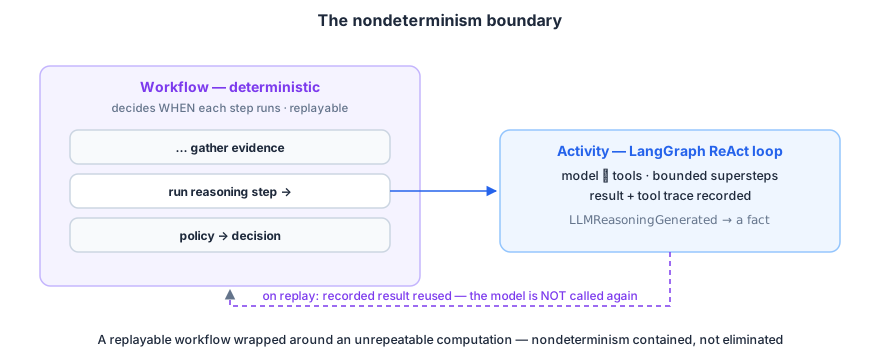
Once the activity completes, its result is stored in Temporal history. During workflow replay, the model is not called again. The workflow gets the previously recorded result.
However, an activity can execute more than once before its completion is recorded. For example:
- The activity calls the model.
- The activity appends
LLMReasoningGeneratedto Postgres. - The worker dies before Temporal receives the activity completion.
- Temporal retries the activity.
The second execution may call the model again. Because of this, all effects inside an activity must be idempotent. In Chronicle, tools used by the reasoning agent are read-only, and event append is idempotent using stream position.
Running the complete graph inside one activity means a retry can repeat the whole reasoning loop. This is a good starting point when the graph is small and tools are inexpensive. If a reasoning loop is long or costly, we can either checkpoint LangGraph inside the activity or move individual graph steps into separate Temporal activities.
Use deterministic code for final decisions
The LLM in Chronicle generates the investigation narrative, but it does not directly approve or deny the transaction.
Evidence agents produce flags such as:
Policy code maps these flags to weights and calculates the score:
RISK_WEIGHTS = {
    "UNKNOWN_DEVICE": 20,
    "HIGH_RISK_COUNTRY": 35,
    "AMOUNT_ABOVE_CUSTOMER_AVERAGE": 25,
    "NEW_ACCOUNT": 15
}

score = sum(RISK_WEIGHTS[flag] for flag in known_flags)

if score >= 70:
    verdict = "DENY"
elif score >= 40:
    verdict = "REVIEW"
else:
    verdict = "APPROVE"
The actual values are domain-specific, but the separation is important:
- Agents gather evidence.
- The LLM explains the evidence.
- Deterministic code makes the final policy decision.
The RiskAssessed event stores the flags, weights, score, thresholds, evidence coverage and final verdict. If someone asks why a transaction was denied, we can show the exact inputs and calculation instead of asking another model to interpret an old model output.
This boundary also works as a guardrail. Tool permissions, structured-output validation, token budgets, graph step limits and policy checks are implemented in code outside the model. A prompt can guide model behaviour, but it should not be the only control for a consequential action.
Wait for human review
Cases in the middle risk range are sent to a human reviewer. Human response time is different from service response time. A reviewer may respond in a few minutes, after a weekend or not at all.
The workflow first appends a ManualReviewRequested event and then waits for a signal or timeout:
The reviewer service sends a signal to the workflow using the investigation id. A signal contains the verdict, reviewer id and comment.
Signals should be validated before accepting them:
- Accept a decision only when a review is pending.
- Accept only known verdicts.
- Accept the first valid decision only once.
- Ignore late and duplicate signals.
- Store reviewer identity and comment with the event.
If the reviewer disagrees with policy, both decisions remain in the event stream. RiskAssessed contains the policy recommendation and ManualReviewCompleted contains the human decision.
If no signal arrives within 48 hours, Temporal fires the timer and the workflow completes the case as expired. This is also stored as an event. No investigation remains in an unknown pending state forever.
Publish events using Kafka and the outbox pattern
The event store is the source of truth, but other services need to receive the stored facts. The projection service uses them to update the dashboard, and additional consumers can use the same stream for analytics or alerts.
Chronicle uses two Kafka topics:
| Topic | Purpose | Record key |
|---|---|---|
chronicle.alerts | Starts an investigation | Alert id |
chronicle.events | Publishes stored domain events | Investigation id |
Kafka guarantees ordering only inside a partition. By using investigation id as the record key, all events for the same case go to the same partition and remain ordered for consumers.
We should not write an event to Postgres and then directly publish it to Kafka:
The event exists in the system of record, but consumers never receive it. This is a dual-write problem.
Chronicle uses the outbox pattern. The event row also contains publication state. An outbox relay reads committed, unpublished rows, sends them to Kafka and marks them as published.
while True:
    events = load_unpublished_events(limit=100)

    for event in events:
        kafka.publish(
            topic="chronicle.events",
            key=event.stream_id,
            value=event
        )
        mark_as_published(event.event_id)
If the relay dies after publishing but before marking the row, it publishes the event again after restart. This is expected, so consumers must be idempotent.
Kafka is useful when multiple consumers need the event stream and should operate independently. If the system has only one projection and low volume, a direct relay from the event store to the projection database may be simpler. The outbox boundary is important; Kafka itself is optional until we need independent fan-out.
Handle duplicate delivery
Duplicate delivery can happen at multiple places:
- Kafka redelivers a record after a consumer group rebalance.
- Temporal retries an activity after a timeout.
- The outbox relay republishes an event after a failure.
- A client submits the same alert twice.
Instead of trying to get exactly-once delivery across all systems, we make every boundary idempotent.
Chronicle uses the following stable identities:
- Alert id becomes the Temporal workflow id.
- Alert id becomes the event stream id.
- Investigation id becomes the Kafka partition key.
- Event id is used when updating projections.
- Stream position has a unique constraint in the event store.
A repeated append at the same stream position becomes a no-op. A projection upserts using event id. Starting an existing workflow returns a known already-started result.
Kafka consumers commit offsets only after the next system durably owns the work. The alert consumer commits its offset after Temporal accepts the workflow start. If it crashes before commit, Kafka delivers the alert again and the same workflow id prevents a second investigation.
This gives us effectively-once results using at-least-once delivery and idempotent processing.
Record missing and degraded evidence
An agent can fail even after all retries are exhausted. We should not treat a missing response as an empty or safe response.
Chronicle originally calculated risk by adding weights for the flags returned by agents. If the customer evidence agent failed, its flags were missing and the score became lower. Missing evidence was incorrectly treated the same as evidence that showed no risk.
The workflow now appends an EvidenceUnavailable event when an expected agent does not return a usable result. Policy receives both the available evidence and evidence coverage.
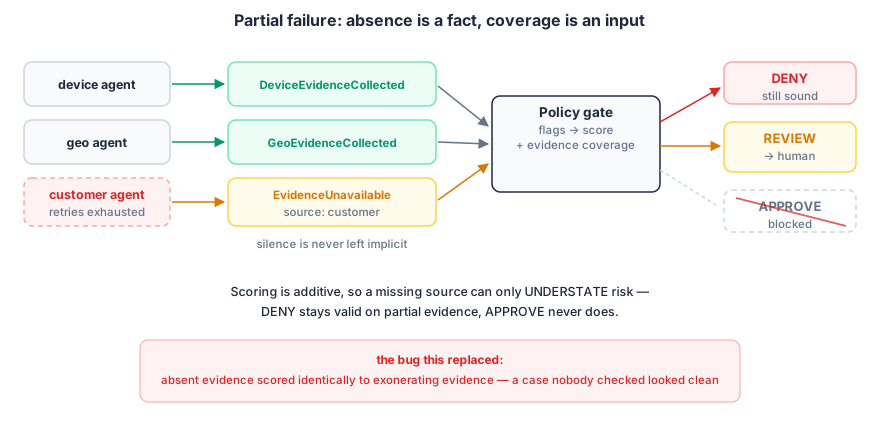
Since the fraud score is additive, additional evidence can only increase risk. This gives us the following policy for partial evidence:
DENYcan remain valid because missing flags can only increase the score.APPROVEis not safe because the missing source may contain risk flags.- A possible
APPROVEwith incomplete coverage is changed toREVIEW.
We also need to distinguish between retry state and result quality:
retryableis a property of an activity attempt and belongs to Temporal.degradedis a property of a returned fact and belongs in the event.unavailablemeans the expected fact never arrived and should be recorded separately.
For every agent input, the consumer should define whether it is required or advisory, what to do when it is degraded and what to do when it never arrives.
Build projections and agent memory
Reading and folding a full event stream for every dashboard request is not efficient. We use projections to maintain read models designed for different queries.
For example, the investigation dashboard projection can contain:
investigation_id
status
risk_score
policy_verdict
human_verdict
evidence_received
evidence_missing
started_at
completed_at
The projection service consumes chronicle.events and applies each event to the read model. Since the projection is derived from the event store, it can be deleted and rebuilt.
The reasoning agent context is also a projection. Before running LangGraph, Chronicle reads the evidence events for the investigation and creates a bounded prompt containing device, geo and customer facts. This allows us to later reconstruct what information was available to the model.
We also store the tool-call trace inside LLMReasoningGenerated:
{
  "tool": "get_customer_history",
  "arguments": {"customer_id": "customer-128"},
  "result": {
    "account_age_days": 2583,
    "average_transaction_amount": 303
  }
}
This helps answer which additional information the agent requested before generating its analysis.
Understand the three types of replay
The architecture contains three ordered histories:
- The event store contains domain history.
- Kafka contains transport history.
- Temporal contains execution history.
All three support something called replay, but these operations are different.
| System | What replay does |
|---|---|
| Event store | Rebuilds projections or state from domain facts |
| Kafka | Redelivers records from an earlier offset |
| Temporal | Reconstructs workflow execution from recorded commands and results |
Event-store replay must not cause external side effects. Rebuilding a projection should not call an LLM, send a notification or deny the transaction again. It only folds stored events into another view.
For production projection rebuilds, create a new projection alongside the old one, replay all events into it, catch up with new events and then switch traffic. This avoids showing an empty or partially rebuilt dashboard.
Verify the workflow
Once all services are running, we can verify the reliability properties of the system.
Verify normal investigation
- Publish an alert to
chronicle.alerts. - Verify that a Temporal workflow starts using the alert id.
- Verify evidence events in the event store.
- Verify
LLMReasoningGeneratedcontains model, prompt and tool-call information. - Verify
RiskAssessedcontains flags, score and verdict. - Verify the dashboard projection reaches the completed state.
Verify worker recovery
- Start an investigation.
- Stop the agent worker while an activity is running.
- Verify that the Temporal workflow remains active.
- Restart the worker.
- Verify that the pending activity is retried and the investigation completes.
Verify duplicate handling
- Publish the same alert twice.
- Verify that only one workflow exists for the alert id.
- Republish one stored event to
chronicle.events. - Verify that the projection does not create duplicate state.
Verify human review
- Create an alert which produces a
REVIEWverdict. - Stop and restart the workflow worker while the workflow is waiting.
- Submit a reviewer decision.
- Verify both the policy recommendation and human verdict in the event stream.
Verify projection replay
- Save the current dashboard state.
- Clear the projection tables.
- Replay all domain events into the projection.
- Verify that the same investigation state is rebuilt.
- Verify that no model, notification or decision side effect is executed during replay.
When to use this architecture
This architecture adds operational complexity. Temporal, Kafka and an event sourced store all need to be operated and monitored.
It is useful when the workflow has most of the following properties:
- It runs for minutes, hours or days.
- It waits for a human or an external system.
- Multiple agents or services contribute to the final result.
- The result affects money, access, health or another important outcome.
- Someone may ask what happened and why after the workflow has completed.
- New projections or audit views need to be built from historical data.
For a short RAG request, text extraction or simple tool-calling agent, this can be more infrastructure than required. Framework checkpointing and a normal database may be enough.
You can still use the important ideas without the complete stack:
- Store important outputs as past-tense facts.
- Treat model output as evidence, not final truth.
- Use deterministic code for consequential decisions.
- Make effects idempotent.
- Record missing and degraded evidence.
- Store the prompt version and tool calls for important model output.
These patterns can first be implemented using one Postgres database. Add Temporal when the workflow needs durable execution and waiting. Add Kafka when multiple independent consumers need the event stream.
Conclusion
In this post, we created an architecture for a reliable event sourced agentic system using Kafka, Temporal and LangGraph.
The event store keeps the permanent domain history. Temporal runs the durable business process and handles retries, timers and human review. LangGraph runs the bounded reasoning loop inside a Temporal activity. Kafka transports stored facts to independent consumers. Deterministic policy code remains responsible for the final decision.
The model is still nondeterministic, and activities can still execute more than once. Reliability comes from recording model output as a fact, making side effects idempotent, explicitly representing missing evidence and keeping one clear owner for each type of state.
You can find the complete reference implementation at https://github.com/saumitras/chronicle and try the live demo.